Linkrium contact archive
Does Archiving a Contact in Linkrium Delete Messages?
Archiving a contact removes that person and their thread from active lists without deleting the synchronized conversation or its message history.
- Publication date
- Published
- Reading time
- 5 min read
- Author
- Linkrium Editorial Team
Checked against first-party documentation on for Web. Interfaces change and rollouts are staged, so confirm details in your own app version.
On this page7 sections
Archiving is meant for a person whose conversation should leave the active working list without being destroyed. Linkrium keeps the contact record, its synchronized conversation, and the message history attached to it. The interface offers an immediate Undo action, and the contact can be restored later.
That narrow promise matters. It does not mean every message is permanent. Provider deletion, disappearing content, retention settings, account deletion, and workspace destruction are separate operations with different consequences.
Quick answer#
Choose Archive contact when you want to remove a person and their thread from active Contacts and Inbox lists but keep the synchronized history. Linkrium sends nothing to the person. If you change your mind, use Undo or restore the archived contact.
Do not use “archive” as a synonym for permanent storage. It is a reversible organization state inside the workspace, not a backup of content that Instagram, WhatsApp, email, or another provider no longer exposes.
What Linkrium keeps when you archive a contact#
The archive action preserves the contact's existing synchronized record:
- the unified conversation associated with the contact;
- the synchronized message history in that conversation;
- the contact's linked channel identities and profile context;
- references that depend on the original conversation remaining available.
The contact stops appearing in the normal contact list, and their direct conversation leaves the active inbox. Because an archived contact is no longer part of the active working set, it also stops contributing to the normal contact allowance and unread view until it returns.
How to archive without losing the thread#
- Open Contacts and select the person.
- Choose Archive contact from the contact actions.
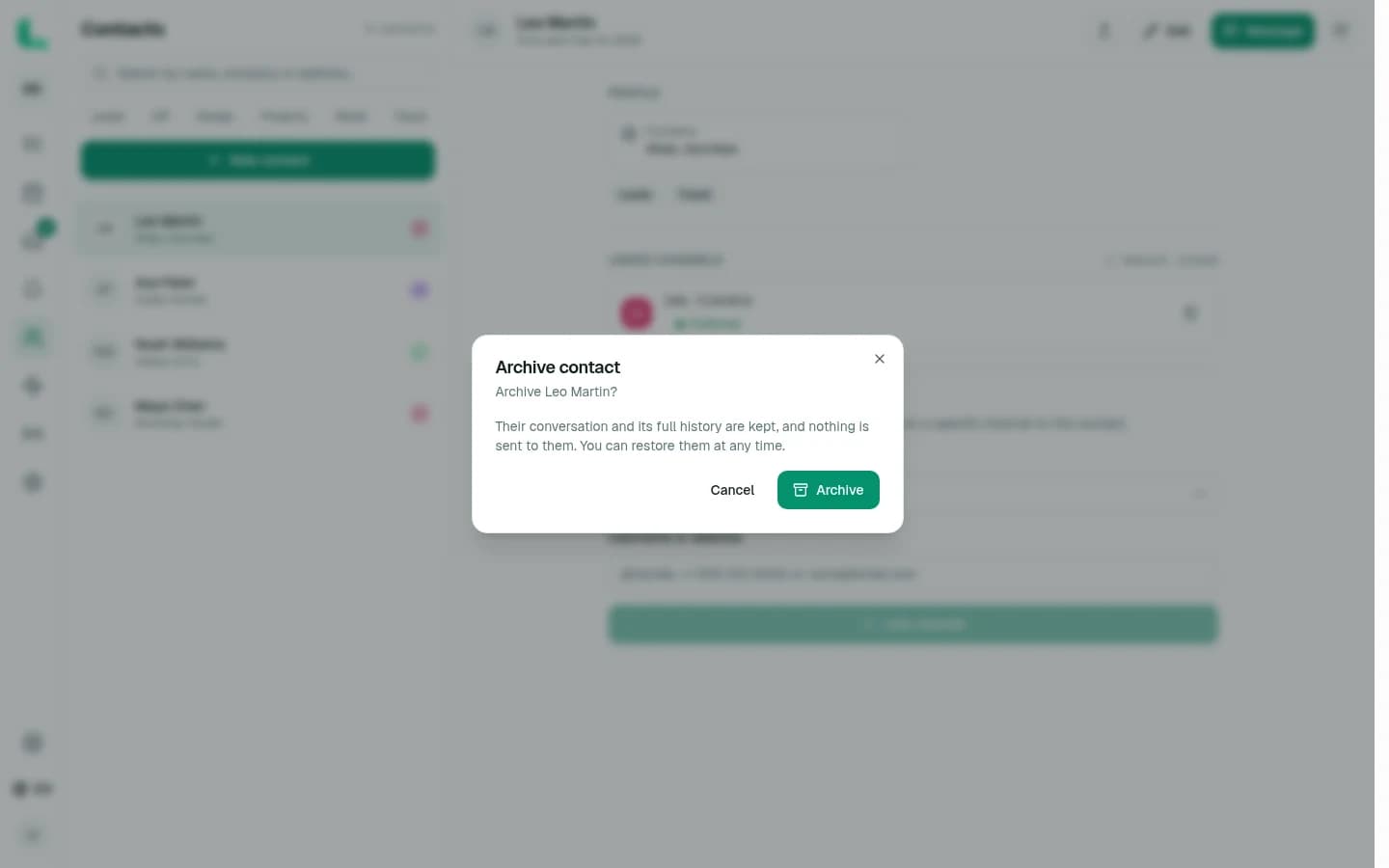
- Read the confirmation, which states that the conversation and its full history are kept.
- Select Archive.
- Use Undo in the confirmation notice if the action was accidental.
Nothing is sent through the person's connected channels. The change affects how the workspace organizes the contact; it is not a remote block, delete, or notification.
How restoration works#
Restoring reverses the archive state and returns the same contact and conversation to active lists. It does not create a second contact or import a second copy of the history.
Linkrium also continues to recognize the archived person's linked channel identities. If a new supported inbound message arrives from one of those identities, Linkrium restores the existing contact before placing the message in the inbox. This prevents the same address or account from forking into a duplicate contact and keeps the new message with the existing history.
Archive, hide, merge, and delete are different#
| Action | What leaves the active view | What happens to synchronized messages |
|---|---|---|
| Archive contact | The contact and their direct conversation | History is kept and the contact can be restored |
| Hide conversation | One user's inbox row | The conversation remains available in the Hidden view |
| Merge duplicate contacts | The duplicate contact record | Eligible identities and messages move to the surviving contact |
| Unsave a message | The personal bookmark | The original message remains in its conversation |
| Provider-side deletion | Depends on the provider and synchronization state | Linkrium cannot promise recovery of content the provider no longer exposes |
| Delete account or workspace | The account or workspace data governed by that action | This is a destructive data-lifecycle action, not archiving |
Hiding is personal inbox organization and can apply to direct or group conversations. Archiving is a contact-level state. Merging repairs duplicate identities and has its own confirmation because the duplicate record is removed. None of those controls should be described as identical.
What archiving does not guarantee#
Archive preserves the synchronized history that exists in Linkrium at the time; it does not expand provider history or override external deletion. A message may still be unavailable because it disappeared at the provider, fell outside connection history, was unsupported, never synchronized, or was removed through an applicable retention or account-deletion process.
For important records, apply the retention, export, legal, and security practices appropriate to your organization. A convenient archive control is not a substitute for a documented records policy.
When to archive a contact#
Archive is useful when a relationship is inactive, a project is finished, or the person should leave the working queue but may need to return later. Keep the contact active when a reply, task, decision, or follow-up is still pending.
For lighter organization, add a contact tag and use its filtered list instead. The guide to contact tags and saved messages explains how to narrow the active list without archiving anyone.
Frequently asked questions
Does archiving a Linkrium contact delete their messages?
No. Archiving removes the contact and conversation from active lists while keeping the synchronized conversation and its full history. You can undo the action or restore the contact while that workspace data remains available.
Does Linkrium notify someone when I archive them?
No. Archiving is an organizational action inside your Linkrium workspace. The confirmation explicitly states that nothing is sent to the contact.
What happens if an archived contact sends another message?
When Linkrium receives a new supported message from the same linked identity, it restores the existing contact so the new message is not stranded in a hidden thread or placed under a duplicate contact.
Is archiving the same as permanently deleting workspace data?
No. Account or workspace deletion, provider-side deletion, retention controls, and other genuine destruction paths have different consequences. Archive should not be described as a permanent-storage guarantee.
Official sources
Every platform behavior described above is traced back to first-party documentation.